Rows Tab
The Rows tab controls everything that draws on every row in the hierarchy: backgrounds, scan-improvement effects, the inactive-state look, and selection.
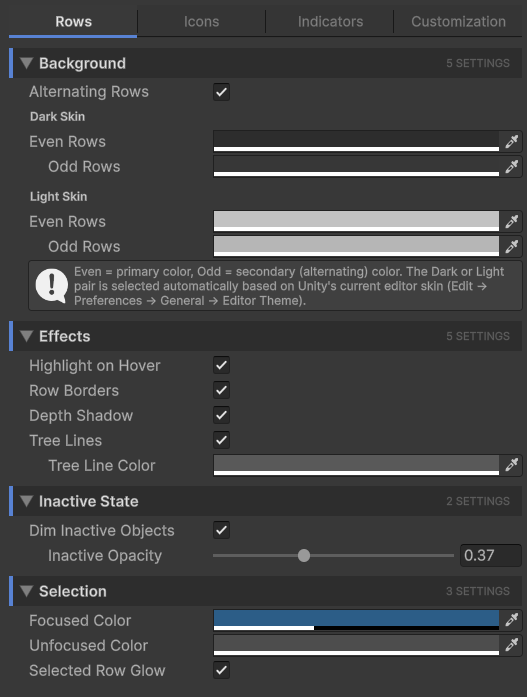
Background
| Setting | Effect |
|---|---|
| Alternating Rows | Tints odd rows with the secondary color so consecutive rows are easier to scan. When off, every row uses the primary color. |
| Even Rows (Dark/Light) | The primary row body color. Used on every row when alternating is off, or on even-numbered rows when it's on. |
| Odd Rows (Dark/Light) | The secondary row body color. Only takes effect when Alternating Rows is on. |
Two sets of colors are stored, one for Unity's dark editor skin and one for the light skin. The active set is picked automatically based on Edit → Preferences → General → Editor Theme.
Effects
| Setting | Effect |
|---|---|
| Highlight on Hover | The row under your mouse cursor gets brightened. Helpful for tracking which row a click would land on. |
| Row Borders | A subtle 1px line is drawn between rows. Useful at higher row densities. |
| Depth Shadow | A soft shadow is drawn at the left edge of each nesting level so depth reads at a glance, even on flat color rows. |
| Tree Lines | Connector lines drawn between parent and child rows, like a file tree. |
| Tree Line Color | The color of the tree connector lines. Only takes effect when Tree Lines is on. |
Inactive state
GameObjects that are disabled in the hierarchy can be visually de-emphasized.
| Setting | Effect |
|---|---|
| Dim Inactive Objects | When on, inactive GameObjects render at reduced opacity. Their text, icons, and row body all fade. |
| Inactive Opacity | The dim factor. 0 means fully invisible, 1 means no dim at all. The slider is a multiplier applied to row contents. Only takes effect when Dim Inactive Objects is on. |
The default value (around 0.4) is a good balance: inactive rows are clearly de-emphasized but still readable.
Selection
How selected rows look. Unity's hierarchy distinguishes between focused and unfocused selection (the keyboard focus is in the Hierarchy vs. somewhere else like the Scene view).
| Setting | Effect |
|---|---|
| Focused Color | Row body color when the Hierarchy window has keyboard focus. The visually loud "this is selected" color. |
| Unfocused Color | Row body color when the Hierarchy doesn't have focus. Usually a quieter gray so it doesn't compete with the Scene view. |
| Selected Row Glow | Adds a soft glow at the bottom edge of the selected row. Subtle, but makes the selected row pop without changing the body color. |