The Profile Attribute
[Profile] is the primary way you drive Profiler Decorator. You place it in your code, and an IL post-processor weaves timing instrumentation into the compiled assembly. There are no manual timer calls to write and nothing to strip before a build.
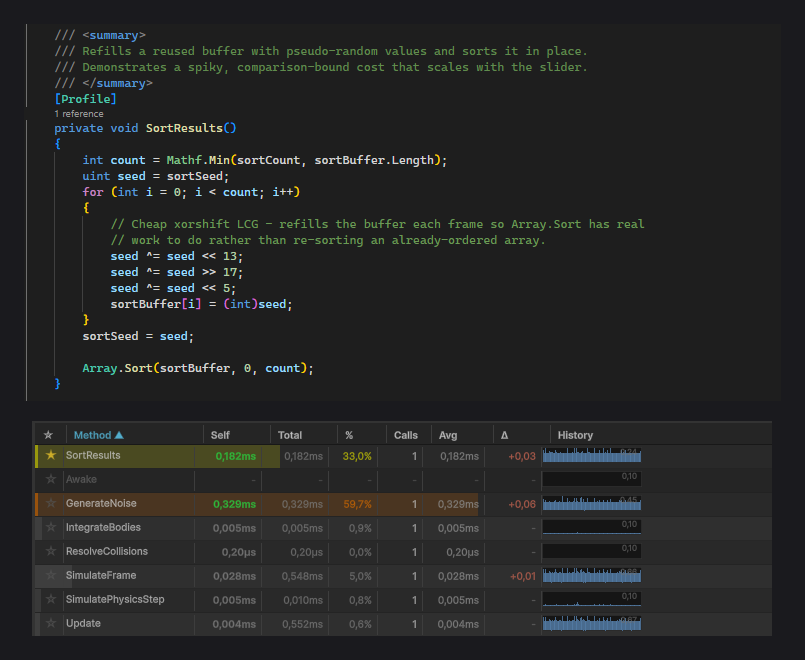
Method level
Add [Profile] to a single method to measure just that method:
using SpaceWhale.ProfilerDecorator;

public class MeshBaker : MonoBehaviour
{
    [Profile]
    public void BakeChunk()
    {
        // Only this method is timed.
    }
}
Each time the method runs, its self time (exclusive) and total time (inclusive of any nested [Profile] calls) are recorded for the current frame.
Class level
Add [Profile] to a class to profile every method in it. This is the fastest way to find the hot method inside a subsystem without annotating each one:
using SpaceWhale.ProfilerDecorator;

[Profile]
public class GraphGenerator
{
    public void Generate() { /* timed */ }
    private void Subdivide() { /* timed */ }
    private void Relax() { /* timed */ }
}
Nested calls between the class's own methods build a self vs total breakdown, so you can see which method owns the time even when they call each other.
Name and Color
Class-level [Profile] accepts a display name and a color for the profiler's box in the window and its console log header. Color takes a hex string, with or without the leading #:
[Profile(Name = "Dungeon Generation", Color = "#FF6600")]
public class GraphGenerator { /* ... */ }
Name and Color are read at the class level. Without Name, the class name is used; without Color, the profiler defaults to light blue.
AutoLog
Class-level [Profile] also exposes AutoLog (default true). When enabled, the profiler writes a formatted summary to the Unity console when its session ends. Set it to false to keep the console quiet and read results only in the window:
[Profile(Name = "Physics Pass", AutoLog = false)]
public class PhysicsPass { /* ... */ }
Excluding a method with [NoProfile]
When a class carries [Profile], every method is instrumented, including trivial ones like getters. Mark the methods you do not care about with [NoProfile] to keep the table focused:
[Profile]
public class GraphGenerator
{
    public void Generate() { /* timed */ }

    [NoProfile]
    public int NodeCount => _nodes.Count; // skipped
}
What gets instrumented
[Profile] and [NoProfile] apply to methods and constructors. [Profile] additionally applies to classes (which cascades to their methods).
Zero cost in builds
Do not wrap [Profile] in #if UNITY_EDITOR. The IL post-processor needs to find the attribute in the compiled assembly. The attribute itself is inert metadata with no runtime behavior, and the timing bodies it drives are Editor-only, so a player build measures nothing and pays nothing.